감마(Gamma) AI 무료 범위 — 가입 크레딧 400개는 다시 채워지지 않습니다
감마(Gamma)는 프롬프트 한 줄로 발표자료·문서·웹사이트를 만드는 도구입니다. 가입만 하면 400크레딧이 들어오고, 신용카드도 필요 없습니다.12
여기서 대부분이 오해하는 지점이 하나 있는데요. 무료 크레딧은 매달 채워지지 않습니다. 감마 도움말은 무료 요금제에서 크레딧이 갱신되지 않으며, 처음 받은 크레딧을 다 쓰면 추천으로 더 얻거나 유료로 올려야 한다고 적었습니다.3
무료로 만든 자료를 내보낼 때 붙는 표시도 미리 알고 시작하는 편이 낫습니다. Made by Gamma 배지는 내보내는 시점의 요금제를 기준으로 붙습니다.4
정리 기준은 2026년 9월 기준 감마 한국어 요금 페이지와 공식 도움말 문서이고, 거기에 적힌 것만 옮겼습니다.5
무료 요금제에 들어 있는 것
한국어 요금 페이지의 Free 칸은 간단한 프로젝트를 만들며 감마를 알아보려는 사용자용으로 설명돼 있습니다.5
들어 있는 것은 네 갈래입니다. 가입 시 400크레딧, 프롬프트당 최대 10개까지 슬라이드 생성,1 PDF·PPTX 가져오기, PDF·PPTX·PNG·Google Slides로 내보내기입니다.6
즉 무료라고 내보내기가 막혀 있지는 않습니다. 막히는 것은 뒤에 나올 배지 쪽입니다.
결제 정보도 필요 없습니다. 요금 페이지는 무료 시작에 신용카드가 필요 없다고 적었습니다.2
무료 크레딧은 다시 채워지지 않는다
먼저 확인할 문장이 하나 있습니다. 감마 도움말은 무료 요금제에서 모든 AI 작업이 크레딧을 쓰고 크레딧은 갱신되지 않는다고 밝혔습니다.3
매달 채워지는 쪽은 유료입니다. 연간 결제든 월간 결제든 크레딧이 매달 리필된다고 적혀 있습니다.7
유료의 월 배정량은 요금제 칸에 그대로 있습니다. Plus는 월 1,000크레딧,8 Pro는 월 4,000크레딧,9 Ultra는 월 20,000크레딧입니다.10
남은 크레딧도 무한정 쌓이지는 않습니다. 플랜 크레딧은 요금제 크기의 두 배까지 이월되고, Plus라면 최대 2,000크레딧까지 보유할 수 있습니다.11
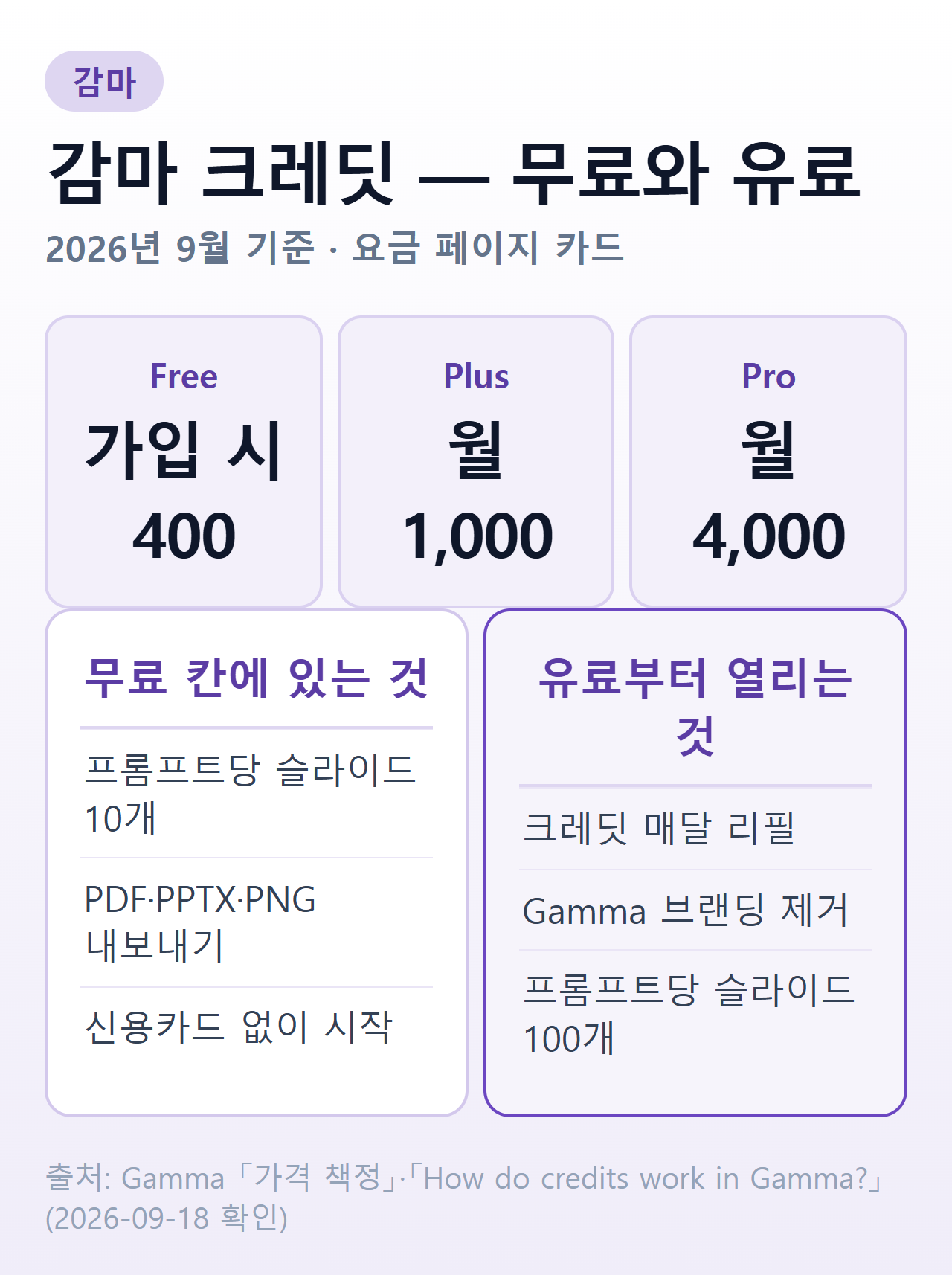 요금 페이지·도움말 기준 정리 — Gamma 「가격 책정」(2026-09-18 확인)1
크레딧이 깎이는 자리
크레딧은 감마 안의 AI 기능 전반에서 쓰입니다. AI로 프레젠테이션을 만들 때는 슬라이드 단위와 이미지 단위로 미터링되고, 에이전트 편집·AI 카드 추가·새 레이아웃 시도도 크레딧을 씁니다.12
같은 작업이라도 소모량은 달라집니다. 무엇을 하는지, 어떤 AI 모델을 쓰는지, 생성물의 길이와 복잡도가 함께 반영됩니다.13
이미지 쪽은 미리 볼 수 있습니다. 이미지 생성·편집은 만들기 전에 모델별 크레딧 비용이 표시됩니다.14
반대로 깎이지 않는 자리도 있습니다. AI 오류나 확인 요청에는 크레딧이 청구되지 않습니다.15
소모율 자체가 고정된 값은 아닙니다. 감마는 크레딧 소모율과 소모 대상 작업이 변경될 수 있다고 적어 두었습니다.16
무료에서 크레딧을 더 얻는 방법
무료 사용자에게 열린 경로는 추천입니다. 무료 요금제에서는 추천 한 건당 200크레딧을 받을 수 있고, 추천은 무료 사용자로 제한됩니다.17
무한정 쌓이지는 않습니다. 무료 계정은 사용자당 한 번에 최대 2,000크레딧까지 가질 수 있습니다. 쓰면서 계속 더 벌 수 있고 총 획득량 자체에는 제한이 없습니다.18
유료 사용자라면 사는 쪽이 열립니다. 추가 크레딧은 1,500개 단위로 1,500크레딧에 6달러입니다.19
산 크레딧은 성격이 다릅니다. 요금제가 살아 있는 동안 만료되지 않고 보유 상한도 없으며,20 이월 한도 계산에도 들어가지 않습니다.21
쓰이는 순서도 정해져 있습니다. 플랜 크레딧이 먼저, 그다음이 구매 크레딧, 워크스페이스 크레딧이 마지막입니다.22
크레딧이 떨어졌을 때
유료 요금제에서 크레딧이 바닥나도 문서가 잠기지는 않습니다. AI가 아닌 기능은 모두 쓸 수 있고 직접 편집도 가능합니다.23
무료 요금제는 선택지가 둘뿐입니다. 추천으로 더 얻거나 유료로 올리는 것입니다.3
플랜 크레딧은 결제일에 새로 채워집니다.24 그래서 유료로 올린 뒤에는 “언제 채워지나”가 아니라 “결제일이 언제인가”를 보면 됩니다.
내보낸 파일에 붙는 Made by Gamma 배지
조건은 만든 날짜가 아니라 내보낸 날짜입니다. 워크스페이스가 내보내기 시점에 무료 요금제면 PDF·PPTX 내보내기에 배지가 들어가고, 유료로 만든 문서라도 구독이 끝났다면 배지가 찍힙니다.4
되돌리는 것도 앞쪽으로만 됩니다. 유료로 다시 구독하면 이후 내보내기에서 배지가 빠지지만 이미 내보낸 파일에는 소급되지 않습니다.25
구독이 끝난 뒤도 같은 규칙입니다. 만료되면 워크스페이스가 무료로 돌아가고, 그 시점 이후의 내보내기에는 유료 기간에 만든 문서라도 배지가 들어갑니다.26
한 가지 예외가 문서에 적혀 있습니다. 로그인한 상태에서 브라우저 인쇄로 뽑으면 요금제와 무관하게 배지가 붙지 않습니다.27
내보내기 형식과 알아 둘 한계
내보내기는 편집 화면에서 형식을 고르는 방식입니다.
표는 이미지로 굳지 않습니다. PPTX로 내보내면 표가 진짜 편집 가능한 표로 나가고, 이 동작은 모든 요금제에서 기본값입니다.29
글꼴도 따로 설치할 필요가 없습니다. PDF 내보내기에는 글꼴이 직접 포함돼 어느 컴퓨터에서 열어도 같게 보인다고 안내합니다.30
모든 효과가 그대로 나가지는 않습니다. 그라디언트 제목은 내보내기에서 다르게 표시되거나 단색으로 바뀔 수 있습니다.31
유료를 결제했다가 취소하면
취소해도 그날 끊기지 않습니다. 구독은 현재 결제 주기가 끝날 때까지 유지됩니다.32
다만 타이밍 조건이 다른 서비스보다 깐깐합니다. 다음 주기 요금을 피하려면 갱신일 최소 30일 전에 취소해야 하고, 자동 갱신 알림을 받았다면 그 알림 날짜로부터 30일 안에 취소해야 합니다.33
취소 뒤 계정은 사라지지 않습니다. 만든 자료는 그대로 남고 무료 요금제 기능으로 계속 쓸 수 있으며, 유료 기능만 결제 주기가 끝나면서 닫힙니다.34
이때 배지 규칙이 다시 걸립니다. 무료로 돌아간 뒤의 내보내기에는 배지가 들어갑니다.26
환불은 3일 · 크레딧 사용량까지 본다
2025년 12월 1일부터 규정이 좁아졌습니다. 감마는 결제 후 3일 이내에 고객지원에 연락한 경우에만 환불하며, 3일 안에 취소만 해서는 자동으로 환불되지 않고, 크레딧 사용량 한도도 넘지 않아야 한다고 적었습니다.35
한도는 요금제마다 다릅니다.
| 요금제 | 월 크레딧 | 사용량 한도 | 환불 가능 조건 |
|---|---|---|---|
| Plus | 1,000 | 20% | 200크레딧 미만 사용36 |
| Pro | 4,000 | 15% | 600크레딧 미만 사용37 |
| Business | 10,000 | 10% | 1,000크레딧 미만 사용38 |
| Ultra | 20,000 | 10% | 2,000크레딧 미만 사용39 |
3일이 지나면 원칙적으로 환불이 없습니다. 다만 같은 문서는 관련 법이 요구하는 경우는 예외라고 적었습니다.40
이 단서가 한국 이용자에게 중요합니다. 감마는 환불 조건이 각국 소비자보호법의 적용을 받는다고 따로 밝혔습니다.41
국내에서 그 법은 전자상거래법입니다. 계약내용에 관한 서면을 받은 날부터 7일, 공급이 늦었다면 공급이 시작된 날부터 7일이 청약철회 기간입니다.42
이 7일을 구독에 그대로 적용하기는 어렵습니다. 같은 조 제2항제5호가 용역이나 디지털콘텐츠의 제공이 개시된 경우에는 청약철회를 할 수 없다고 정해 두었기 때문입니다.43 구독은 결제 직후 제공이 시작됩니다.
예외는 두 군데입니다. 하나는 같은 호 단서입니다. 가분적 용역·가분적 디지털콘텐츠로 이뤄진 계약이면 아직 제공이 시작되지 않은 부분에는 이 제한이 걸리지 않습니다.43
다른 하나는 제2항 본문 단서입니다. 판매자가 제6항에 따른 표시 조치를 하지 않았다면 제2호부터 제5호까지에 해당해도 청약철회를 할 수 있습니다.44
그래서 「한국이니 7일 안에는 무조건 환불」로 읽으면 곤란합니다. 감마가 정한 3일 창구가 먼저이고, 전자상거래법을 들더라도 제공 개시 여부와 위 단서를 따져야 합니다.
업무 자료를 넣기 전에 볼 것
감마는 자기 데이터가 AI 모델 학습에 쓰이는지를 사용자가 직접 제어할 수 있다고 안내합니다.45
지우는 쪽도 열려 있습니다. 콘텐츠나 계정 전체를 언제든 삭제할 수 있습니다.46
국내 안내도 같은 지점을 짚습니다. 개인정보보호위원회는 생성형 AI 이용자 가이드에서 입력 내용의 AI 학습 활용 여부와 업무 관련 자료 입력 시 주의사항을 핵심 항목으로 다뤘습니다.47
발표자료는 사내 수치와 고객사 이름이 섞이기 쉬운 문서입니다. 그래서 첫 프롬프트를 넣기 전에 학습 설정부터 확인해 두는 편이 낫습니다.45
한국어로 쓰기
화면 언어는 따로 설정할 필요가 거의 없습니다. 감마는 브라우저 언어를 자동으로 감지해 맞춘다고 안내합니다.48
요금 페이지도 한국어로 제공됩니다.5 도움말 문서는 일부만 번역돼 있어 세부 규정은 영어 원문 쪽이 더 자세합니다.
자주 묻는 질문
감마 AI는 무료로 쓸 수 있나요?
됩니다. 2026년 9월 기준 요금 페이지의 Free 칸은 가입 시 400크레딧과 프롬프트당 최대 10개 슬라이드 생성을 적어 두었습니다.1
내보내기도 무료 칸에 있습니다. PDF·PPTX·PNG·Google Slides로 내보낼 수 있고 PDF·PPTX 가져오기도 됩니다.6
무료 크레딧은 매달 다시 채워지나요?
아닙니다. 무료 요금제는 모든 AI 작업이 크레딧을 쓰고 크레딧은 갱신되지 않습니다.3
매달 채워지는 것은 유료 쪽입니다. 연간·월간 결제 모두 크레딧이 매달 리필됩니다.7
무료인데 크레딧을 더 얻는 방법이 있나요?
추천이 유일한 무료 경로입니다. 추천 한 건당 200크레딧이고 추천은 무료 사용자에게만 열려 있습니다.17
보유 상한은 한 번에 2,000크레딧입니다. 총 획득량에는 제한이 없습니다.18
무료로 만든 자료에 감마 로고가 찍히나요?
내보내기에 찍힙니다. 내보내는 시점에 무료 요금제면 PDF·PPTX에 배지가 들어가고 문서를 만든 시점은 기준이 아닙니다.4
인쇄는 예외입니다. 로그인 상태에서 브라우저 인쇄로 뽑으면 요금제와 무관하게 배지가 없습니다.27
유료로 결제했다가 환불받을 수 있나요?
조건이 좁습니다. 2025년 12월 1일부터 결제 후 3일 이내에 고객지원에 연락한 경우에만 환불되고, 취소만으로는 자동 환불되지 않습니다.35
크레딧을 얼마나 썼는지도 봅니다. Plus는 200크레딧 미만,36 Pro는 600크레딧 미만,37 Ultra는 2,000크레딧 미만이어야 합니다.39
국내 법은 그 위에 얹힙니다. 감마는 환불 조건이 각국 소비자보호법의 적용을 받는다고 적었고,41 전자상거래법은 청약철회 기간을 7일로 정하고 있습니다.42
7일이 자동으로 보장되지는 않습니다. 같은 조 제2항제5호가 용역·디지털콘텐츠의 제공이 개시된 경우 청약철회를 제한하는데,43 구독은 결제 직후 제공이 시작되기 때문입니다.
참고
- AI 종류와 무료 이용 범위 — 쓰임으로 나눈 AI 서비스 갈래
- 클로바노트 무료 범위와 사용법 — 회의 기록 쪽 도구의 무료 한도
- 수노(Suno) 무료 범위와 AI 음악 권리 — 만든 결과물의 이용 권리 기준
- 챗GPT 무료 이용 범위와 요금제 — 대화형 AI의 무료 범위 비교
-
Gamma, 「가격 책정 — 자신에게 맞는 요금제 선택」, https://gamma.app/ko/pricing (2026-09-18 확인). Free 요금 카드 나열 “가입 시 400크레딧 제공 프롬프트당 최대 10개까지 슬라이드 생성” ↩ ↩2 ↩3 ↩4
-
Gamma, 「가격 책정 — 자신에게 맞는 요금제 선택」, https://gamma.app/ko/pricing (2026-09-18 확인). “월별 결제 연간 결제 신용 카드 필요 없음” ↩ ↩2
-
Gamma, 「How do credits work in Gamma?」, https://help.gamma.app/en/articles/7834324-how-do-credits-work-in-gamma (2026-09-18 확인). “On the Free plan, all AI actions use credits, and credits do not refresh. Once your initial credits are used, you must either earn more through referrals or upgrade to a paid plan.” ↩ ↩2 ↩3 ↩4
-
Gamma, 「What’s the easiest way to export my gamma?」, https://help.gamma.app/en/articles/8022861-what-s-the-easiest-way-to-export-my-gamma (2026-09-18 확인). “The ‘Made by Gamma’ badge appears on PDF and PPTX exports when your workspace is on the Free plan at the time of export — regardless of when the document was created. A document made on a paid plan will still show the badge if your subscription has since expired.” ↩ ↩2 ↩3
-
Gamma, 「가격 책정 — 자신에게 맞는 요금제 선택」, https://gamma.app/ko/pricing (2026-09-18 확인). Free 요금 카드 “간단한 프로젝트를 생성하고 Gamma에 대해 알아보고 싶은 사용자에게 적합” ↩ ↩2 ↩3
-
Gamma, 「가격 책정 — 자신에게 맞는 요금제 선택」, https://gamma.app/ko/pricing (2026-09-18 확인). Free 요금 카드 나열 “PDF 및 PPTX에서 가져오기 PDF, PPTX, PNG 및 Google Slides로 내보내기” ↩ ↩2
-
Gamma, 「How do credits work in Gamma?」, https://help.gamma.app/en/articles/7834324-how-do-credits-work-in-gamma (2026-09-18 확인). “On both annual and monthly paid plans, your credits refill monthly. You also have the option to purchase more credits.” ↩ ↩2
-
Gamma, 「가격 책정 — 자신에게 맞는 요금제 선택」, https://gamma.app/ko/pricing (2026-09-18 확인). Plus 요금 카드 나열 “월 1,000크레딧 프롬프트당 최대 100개까지 슬라이드 생성 Gamma 브랜딩 제거” ↩
-
Gamma, 「가격 책정 — 자신에게 맞는 요금제 선택」, https://gamma.app/ko/pricing (2026-09-18 확인). Pro 요금 카드 나열 “월 4,000크레딧 프리미엄 AI 이미지 모델 사용자 지정 브랜딩” ↩
-
Gamma, 「가격 책정 — 자신에게 맞는 요금제 선택」, https://gamma.app/ko/pricing (2026-09-18 확인). Ultra 요금 카드 나열 “월 20,000크레딧 가장 최신 AI 모델(텍스트, 이미지, 영상) 이용” ↩
-
Gamma, 「How do credits work in Gamma?」, https://help.gamma.app/en/articles/7834324-how-do-credits-work-in-gamma (2026-09-18 확인). “Yes, plan credits roll over up to double your plan size. For example, on the Plus Plan with 1,000 monthly credits, you can hold up to 2,000 plan credits at any time.” ↩
-
Gamma, 「How do credits work in Gamma?」, https://help.gamma.app/en/articles/7834324-how-do-credits-work-in-gamma (2026-09-18 확인). “Credits are used for AI features throughout Gamma. Generating presentations with Create with AI uses credits, metered per slide and per image, and other AI actions like editing with Agent, adding cards with AI, and trying new layouts also use credits.” ↩
-
Gamma, 「How do credits work in Gamma?」, https://help.gamma.app/en/articles/7834324-how-do-credits-work-in-gamma (2026-09-18 확인). “The number of credits an action uses can vary based on what you’re doing, which AI model is used, and the length or complexity of the generation.” ↩
-
Gamma, 「How do credits work in Gamma?」, https://help.gamma.app/en/articles/7834324-how-do-credits-work-in-gamma (2026-09-18 확인). “For image generation and editing, you’ll see the credit cost for the model before you generate, so you can choose the option that fits your needs.” ↩
-
Gamma, 「How do credits work in Gamma?」, https://help.gamma.app/en/articles/7834324-how-do-credits-work-in-gamma (2026-09-18 확인). “You will not be charged credits for AI errors or clarification requests.” ↩
-
Gamma, 「How do credits work in Gamma?」, https://help.gamma.app/en/articles/7834324-how-do-credits-work-in-gamma (2026-09-18 확인). “Credit consumption rates and the actions that consume credits are subject to change.” ↩
-
Gamma, 「How do credits work in Gamma?」, https://help.gamma.app/en/articles/7834324-how-do-credits-work-in-gamma (2026-09-18 확인). “If you’re on the Free plan, you can earn 200 credits per referral. Referrals are limited to Free users.” ↩ ↩2
-
Gamma, 「How do credits work in Gamma?」, https://help.gamma.app/en/articles/7834324-how-do-credits-work-in-gamma (2026-09-18 확인). “Free accounts can have up to 2,000 credits at once per user. As you spend credits, you can keep earning more, and there’s no limit to how much you can earn overall.” ↩ ↩2
-
Gamma, 「How do I purchase more credits?」, https://help.gamma.app/en/articles/12466653-how-do-i-purchase-more-credits (2026-09-18 확인). “1,500 credits for $6, purchased in increments of 1,500.” ↩
-
Gamma, 「How do credits work in Gamma?」, https://help.gamma.app/en/articles/7834324-how-do-credits-work-in-gamma (2026-09-18 확인). “Purchased credits: Any credits you buy. These never expire while your plan is active, and have no cap.” ↩
-
Gamma, 「How do credits work in Gamma?」, https://help.gamma.app/en/articles/7834324-how-do-credits-work-in-gamma (2026-09-18 확인). “Purchased credits are tracked separately and do not count toward your rollover cap.” ↩
-
Gamma, 「How do credits work in Gamma?」, https://help.gamma.app/en/articles/7834324-how-do-credits-work-in-gamma (2026-09-18 확인). “When you use AI features, Gamma draws from your plan credits first, then your purchased credits, then your workspace credits (if your plan has them).” ↩
-
Gamma, 「How do credits work in Gamma?」, https://help.gamma.app/en/articles/7834324-how-do-credits-work-in-gamma (2026-09-18 확인). “You will still be able to use all non-AI features, and can manually edit.” ↩
-
Gamma, 「How do credits work in Gamma?」, https://help.gamma.app/en/articles/7834324-how-do-credits-work-in-gamma (2026-09-18 확인). “Plan credits: Your monthly allocation, refreshed on your billing date.” ↩
-
Gamma, 「What’s the easiest way to export my gamma?」, https://help.gamma.app/en/articles/8022861-what-s-the-easiest-way-to-export-my-gamma (2026-09-18 확인). “Resubscribing to any paid plan (Plus, Pro, or Ultra) removes the badge from all future exports. There is no retroactive removal — exports already made on a Free plan keep the badge.” ↩
-
Gamma, 「What’s the easiest way to export my gamma?」, https://help.gamma.app/en/articles/8022861-what-s-the-easiest-way-to-export-my-gamma (2026-09-18 확인). “Once your subscription expires, your workspace reverts to the Free plan. Any exports made from that point forward will include the badge — even for documents you created during your paid period.” ↩ ↩2
-
Gamma, 「What’s the easiest way to export my gamma?」, https://help.gamma.app/en/articles/8022861-what-s-the-easiest-way-to-export-my-gamma (2026-09-18 확인). “Browser printing (Cmd+P or Ctrl+P) from your own editor while signed in does not add the badge — regardless of plan. If you only need a personal printed copy, browser print is always badge-free.” ↩ ↩2
-
Gamma, 「What’s the easiest way to export my gamma?」, https://help.gamma.app/en/articles/8022861-what-s-the-easiest-way-to-export-my-gamma (2026-09-18 확인). “Select one of the available formats: PDF, PNG, or PowerPoint (PPTX)” ↩
-
Gamma, 「What’s the easiest way to export my gamma?」, https://help.gamma.app/en/articles/8022861-what-s-the-easiest-way-to-export-my-gamma (2026-09-18 확인). “When you export to PowerPoint (PPTX), tables in your gamma are exported as real, editable tables. That means you can edit the text and restyle the table directly in PowerPoint — or in Google Slides after uploading the PPTX file. This is on by default for all users on all plans, so there’s nothing to turn on.” ↩ ↩2
-
Gamma, 「What’s the easiest way to export my gamma?」, https://help.gamma.app/en/articles/8022861-what-s-the-easiest-way-to-export-my-gamma (2026-09-18 확인). “Fonts are embedded directly into PDF exports, so your presentation looks the same on any computer — nothing to install.” ↩
-
Gamma, 「What’s the easiest way to export my gamma?」, https://help.gamma.app/en/articles/8022861-what-s-the-easiest-way-to-export-my-gamma (2026-09-18 확인). “Gradient Headings: May render differently or default to a single colour in export.” ↩
-
Gamma, 「How do I manage or cancel my Gamma subscription?」, https://help.gamma.app/en/articles/8568920-how-do-i-manage-or-cancel-my-gamma-subscription (2026-09-18 확인). “Your subscription will remain active until the end of your current billing period.” ↩
-
Gamma, 「How do I manage or cancel my Gamma subscription?」, https://help.gamma.app/en/articles/8568920-how-do-i-manage-or-cancel-my-gamma-subscription (2026-09-18 확인). “To avoid being charged for the next billing period, cancel at least 30 days before your plan’s renewal date. If you received an auto-renewal notification, you have 30 days from the date of that notice to cancel.” ↩
-
Gamma, 「How do I manage or cancel my Gamma subscription?」, https://help.gamma.app/en/articles/8568920-how-do-i-manage-or-cancel-my-gamma-subscription (2026-09-18 확인). “You keep all your gammas and can continue using Gamma with the features included in the free plan. Paid features will no longer be available once your current billing period ends, but your account and all your content remain fully intact.” ↩
-
Gamma, 「What is Gamma’s refund policy and how do I request a refund?」, https://help.gamma.app/en/articles/11048496-what-is-gamma-s-refund-policy-and-how-do-i-request-a-refund (2026-09-18 확인). “Beginning December 1, 2025, Gamma will offer refunds only within the first 3 days of subscribing to one of our paid plans, for both monthly and annual billing options, and only upon contacting Customer Support. You will not automatically receive a refund if you cancel within 3 days of subscribing. Additionally, you must not have exceeded the threshold for credit usage.” ↩ ↩2
-
Gamma, 「What is Gamma’s refund policy and how do I request a refund?」, https://help.gamma.app/en/articles/11048496-what-is-gamma-s-refund-policy-and-how-do-i-request-a-refund (2026-09-18 확인). 환불 한도 표 “Plus 1k 20% less than 200 credits used” ↩ ↩2
-
Gamma, 「What is Gamma’s refund policy and how do I request a refund?」, https://help.gamma.app/en/articles/11048496-what-is-gamma-s-refund-policy-and-how-do-i-request-a-refund (2026-09-18 확인). 환불 한도 표 “Pro 4k 15% less than 600 credits used” ↩ ↩2
-
Gamma, 「What is Gamma’s refund policy and how do I request a refund?」, https://help.gamma.app/en/articles/11048496-what-is-gamma-s-refund-policy-and-how-do-i-request-a-refund (2026-09-18 확인). 환불 한도 표 “Business 10k 10% less than 1,000 credits used” ↩
-
Gamma, 「What is Gamma’s refund policy and how do I request a refund?」, https://help.gamma.app/en/articles/11048496-what-is-gamma-s-refund-policy-and-how-do-i-request-a-refund (2026-09-18 확인). 환불 한도 표 “Ultra 20k 10% less than 2,000 credits used” ↩ ↩2
-
Gamma, 「What is Gamma’s refund policy and how do I request a refund?」, https://help.gamma.app/en/articles/11048496-what-is-gamma-s-refund-policy-and-how-do-i-request-a-refund (2026-09-18 확인). “No refunds are issued after 3 days, except where required by applicable law.” ↩
-
Gamma, 「What is Gamma’s refund policy and how do I request a refund?」, https://help.gamma.app/en/articles/11048496-what-is-gamma-s-refund-policy-and-how-do-i-request-a-refund (2026-09-18 확인). “Refund eligibility conditions, including credit usage thresholds, are subject to applicable local consumer protection laws.” ↩ ↩2
-
법제처 국가법령정보센터, 「전자상거래 등에서의 소비자보호에 관한 법률」 제17조제1항제1호, https://www.law.go.kr/법령/전자상거래 등에서의 소비자보호에 관한 법률/제17조 (2026-09-09 확인). “제13조제2항에 따른 계약내용에 관한 서면을 받은 날부터 7일. 다만, 그 서면을 받은 때보다 재화등의 공급이 늦게 이루어진 경우에는 재화등을 공급받거나 재화등의 공급이 시작된 날부터 7일” ↩ ↩2
-
법제처 국가법령정보센터, 「전자상거래 등에서의 소비자보호에 관한 법률」 제17조제2항제5호, https://www.law.go.kr/법령/전자상거래 등에서의 소비자보호에 관한 법률/제17조 (2026-09-18 확인). “용역 또는 「문화산업진흥 기본법」 제2조제5호의 디지털콘텐츠의 제공이 개시된 경우. 다만, 가분적 용역 또는 가분적 디지털콘텐츠로 구성된 계약의 경우에는 제공이 개시되지 아니한 부분에 대하여는 그러하지 아니하다.” ↩ ↩2 ↩3
-
법제처 국가법령정보센터, 「전자상거래 등에서의 소비자보호에 관한 법률」 제17조제2항, https://www.law.go.kr/법령/전자상거래 등에서의 소비자보호에 관한 법률/제17조 (2026-09-18 확인). “소비자는 다음 각 호의 어느 하나에 해당하는 경우에는 통신판매업자의 의사에 반하여 제1항에 따른 청약철회등을 할 수 없다. 다만, 통신판매업자가 제6항에 따른 조치를 하지 아니하는 경우에는 제2호부터 제5호까지의 규정에 해당하는 경우에도 청약철회등을 할 수 있다.” ↩
-
Gamma, 「How does Gamma protect my data and privacy?」, https://help.gamma.app/en/articles/11048534-how-does-gamma-protect-my-data-and-privacy (2026-09-18 확인). “Data control: You’re in control over whether your data can be used to train Gamma’s AI models.” ↩ ↩2
-
Gamma, 「How does Gamma protect my data and privacy?」, https://help.gamma.app/en/articles/11048534-how-does-gamma-protect-my-data-and-privacy (2026-09-18 확인). “Deletion: You can delete your content or your account entirely at any time.” ↩
-
개인정보보호위원회, 「개인정보위, 「생성형 AI 서비스 이용자를 위한 개인정보 보호 가이드」 발간」, 2026-05-19, https://www.pipc.go.kr/np/cop/bbs/selectBoardArticle.do?bbsId=BS074&mCode=C020010000&nttId=12084 (2026-09-02 확인). “▲입력 내용의 AI학습 활용 여부, ▲업무 관련 자료 입력 시 주의사항, ▲외부 서비스 연동 시 안전성” ↩
-
Gamma, 「How do I use Gamma in my preferred language?」, https://help.gamma.app/en/articles/11016506-how-do-i-use-gamma-in-my-preferred-language (2026-09-18 확인). “Gamma automatically detects your browser language and adjusts accordingly.” ↩